What Is the Best AI Generator for Realistic Swimsuit Photos?
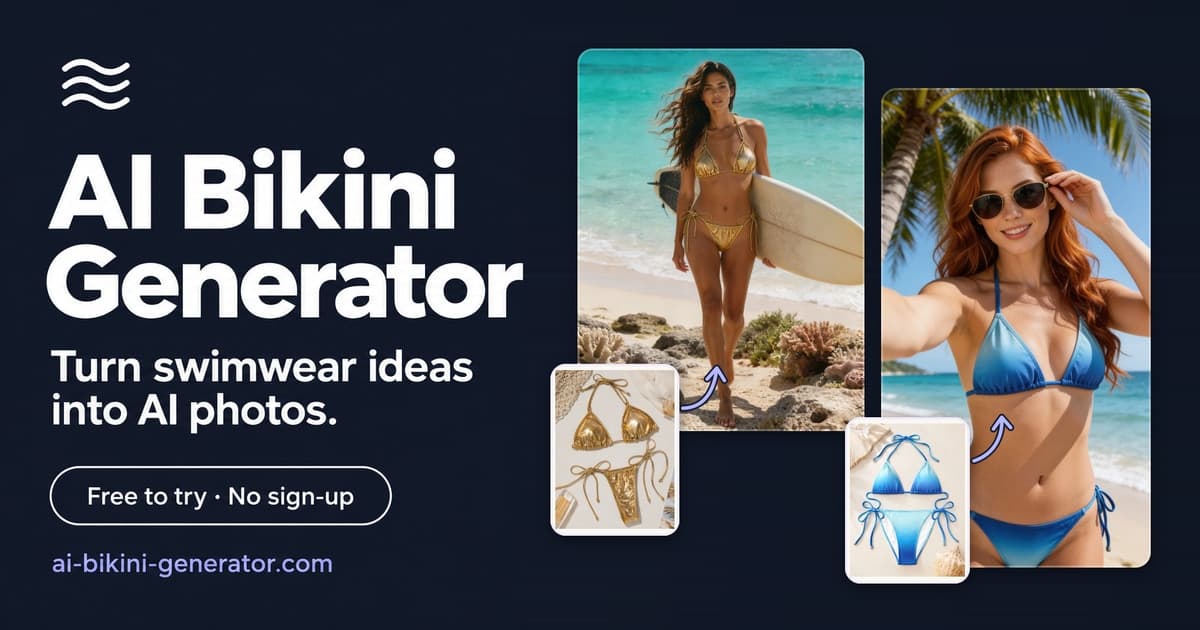
The best AI generator for realistic swimsuit photos depends on the job you need it to do. A creator who wants to preview one bikini on one adult reference photo needs a different tool from a swimwear brand producing hundreds of product listing images.
If you want the short answer, choose a reference-guided swimsuit generator when the person photo and bikini style matter most. Choose a fashion virtual try-on API when you need to plug swimsuit generation into a product workflow. Choose a broader image generator only when the goal is concept art, moodboards, or campaign exploration rather than product accuracy.
Below is a practical roundup of the strongest categories and tools to consider in 2026, with the trade-offs that matter for realistic swimsuit photos.
Editorial note: AI Bikini Generator is our own product, so the recommendation below is framed by workflow fit rather than a universal claim. The comparison uses public product documentation, visible tool workflows, and the specific question users usually have: which tool is most useful when realistic swimsuit output, reference control, and safe adult use matter?
What this roundup is based on
This article compares tools by the job they are actually built to do, not by a generic "best AI image generator" score.
The main criteria are:
- Starting inputs: text prompt, person photo, garment image, product photo, or catalog asset.
- Garment fidelity: whether the workflow helps preserve straps, seams, prints, logos, coverage, and fabric details.
- Person preservation: whether the tool is designed to keep a specific person, model, or brand look consistent.
- Production fit: whether the tool is better for one-off previews, ecommerce listings, API workflows, or creative concepts.
- Review needs: how much human inspection is still needed before publishing.
- Safety and rights: whether the workflow makes adult-only, authorized, and non-explicit use practical.
Source links are included in the relevant sections. Product features, policies, and model names can change, so treat this as a practical buying guide rather than a permanent ranking.
How to judge a realistic AI swimsuit photo generator
Realism is not just sharp skin texture. Swimsuit images are harder than ordinary outfit edits because the garment has small edges, elastic straps, visible body contours, and a lot of exposed skin where lighting or anatomy mistakes become obvious.
Use these checks before trusting any output:
- The face and body shape still resemble the source person, if you uploaded one.
- Bikini straps, waistline, seams, ties, and coverage make physical sense.
- Fabric color, pattern, and logo details do not drift between generations.
- Skin texture looks natural instead of waxy, over-smoothed, or plastic.
- Hands, hair, shoulders, and hips are not warped by the clothing replacement.
- Lighting on the person, garment, and background feels like one photo.
- The tool has clear rules for adult-only, consent-based use.
- Commercial-use terms match how you plan to publish the image.
No AI swimsuit generator should be treated as a fit guarantee. A generated image can help preview styling, direction, and visual merchandising, but it cannot prove how a real garment will stretch, support, or fit on a real body.
Quick comparison: best AI generators for realistic swimsuit photos
| Tool | Best for | Starts from | Main strength | Main limitation |
|---|---|---|---|---|
| AI Bikini Generator | Realistic adult swimsuit previews from person and bikini references | Person photo, bikini reference, presets, or description | Focused swimsuit workflow with references, safety review, and 2K or 4K output | Not a physical fit tool; details still need review |
| FASHN | Developers and ecommerce teams building try-on flows | Model image plus garment image | Fashion API, virtual try-on, product-to-model, model creation, editing, and video endpoints | More technical setup than a consumer web tool |
| Photoroom | Product teams creating listing images | One or more clothing source images | AI fashion models, background, pose, quality, aspect ratio, batch, and Shopify workflows | Broader apparel workflow, not only swimsuit-specific |
| Pic Copilot | Marketplace sellers who want fast product-to-model visuals | Product image plus chosen AI model | Dedicated AI model and try-on tools, including swimsuit model categories | Small text, logos, and fine garment details may still deviate |
| Botika | Fashion brands needing model imagery at scale | Existing apparel photos | AI-generated fashion models and backgrounds for online stores | Best suited to brand workflows, less direct for one-off personal edits |
| OpenArt | Concepts, lookbooks, and prompt-based exploration | Text or image prompts | Flexible bikini concepts, AI influencer images, and product mockups | Less dependable for exact garment construction |
| General photorealistic image generators | Moodboards and campaign ideas | Text prompts or image prompts | Strong artistic range and photo realism | Usually weaker at preserving a specific swimsuit exactly |
1. AI Bikini Generator - best for reference-guided swimsuit previews
AI Bikini Generator is the best fit when the task is specific: create a realistic adult swimsuit photo from a person reference, a bikini reference, or a written direction. That focus matters. Many general image generators can make a good-looking beach photo, but they often reinterpret the garment, change body proportions, or drift away from the original face.
The useful workflow is straightforward: start with a person photo or preset model, choose or upload a bikini reference, then set the scene, pose, aspect ratio, and resolution. The result is meant for adult swimwear previews, catalog concepts, social drafts, and visual exploration.
The main advantage is control over the inputs. If you need a specific garment style, a reference image usually beats a long prompt. If you need a specific person preserved, a person reference gives the model a stronger target than text alone.
Choose AI Bikini Generator if:
- You want a realistic swimsuit image, not a broad fashion editor.
- You are working with adult, authorized reference images.
- You need to compare bikini styles, poses, or scenes before producing final content.
- You care about 2K or 4K output and common social or catalog aspect ratios.
The limitation is the same limitation every serious swimsuit tool has: AI can still alter fabric details, hand placement, body edges, or exact garment construction. Treat the best result as a polished preview, then inspect it closely before using it publicly.
2. FASHN - best for API-driven fashion virtual try-on
FASHN is a strong option for teams that want fashion generation inside a product or ecommerce system. Its documentation describes endpoints for virtual try-on, product-to-model generation, model creation, editing, background manipulation, reframing, and image-to-video. That makes it more of a developer platform than a simple browser-based bikini photo editor.
For virtual try-on, FASHN works from a person image and a garment image. FASHN documents Try-On Max as the recommended endpoint for most applications, while Try-On v1.6 remains available for real-time, cost-sensitive integrations. The v1.6 docs also show practical controls such as garment type, quality mode, seed, output format, and moderation level. Notably, its permissive moderation setting allows swimwear and underwear while still blocking explicit nudity, and its responsible-use notice warns against inappropriate imagery without consent.
Choose FASHN if:
- You are building a custom app, store flow, or internal production pipeline.
- You need an API rather than a manual web interface.
- You want to generate several samples or use fixed seeds for repeatability.
- You have engineering support to handle image preprocessing, polling, and review.
For an individual creator, FASHN may be more setup than necessary. For a brand or developer, that same setup is the point.
3. Photoroom - best for ecommerce product image workflows
Photoroom's AI Fashion Models tool is designed to turn clothing and accessory images into product photos with realistic AI models. The workflow lets users provide one or more source images, then choose settings such as model, background, pose, quality, size, brand style, and prompt. Photoroom also lists access through Batch and Photoroom for Shopify, which makes it practical for sellers handling more than one SKU.
This is useful for swimwear sellers who need structured listing images rather than one artistic result. A swimsuit brand may care about consistent backgrounds, repeatable model direction, and the ability to edit or download the generated result afterward. Photoroom's broader product-photo ecosystem can help there.
Choose Photoroom if:
- Your main goal is ecommerce listing photography.
- You need batch editing, Shopify workflows, or background control.
- You want product-photo tools around the swimsuit image, not only generation.
- You value a familiar editor for cleanup after generation.
The trade-off is specialization. Photoroom is a capable product-photo platform, but if your exact question is "how do I create a realistic bikini try-on from this person and this swimwear reference," a narrower swimsuit-focused tool may feel more direct.
4. Pic Copilot - best for fast marketplace-style swimwear visuals
Pic Copilot offers AI virtual try-on and model tools for ecommerce sellers. Its model library includes categories such as swimsuit models, lingerie models, plus-size models, fitness models, and regional appearance categories. The virtual try-on page positions the tool around turning flat clothing photos into realistic model shots.
The most useful part of Pic Copilot's own guidance is its honesty about input quality. Its try-on help page says swimsuit and underwear try-ons work best when the original model clothing matches the target category, and it warns that current virtual try-on technology can deviate on minor text, logos, and intricate details.
That is exactly the right way to think about swimwear AI. If a bikini has tiny brand marks, complex lace, thin straps, or an unusual cutout, the output may look good at a glance but still be wrong in a product sense.
Choose Pic Copilot if:
- You sell on marketplaces and need fast model-led product images.
- You want swimsuit model categories and ecommerce-style extensions.
- You can provide clean, unobstructed garment images.
- You are willing to QA small details before publishing.
Avoid relying on it as the only review step for logo-heavy or detail-heavy swimwear.
5. Botika - best for fashion brands that need model imagery at scale
Botika describes itself as a generative AI platform for clothing brands and retailers that turns photos into diversified fashion photos using AI-generated models and backgrounds. Its broader site is aimed at fashion teams that need authentic, on-brand imagery at scale.
Botika is worth considering if you are running a real apparel catalog and want a managed fashion-photo workflow. It is less of a quick "upload my photo and try this bikini" tool and more of a brand production system.
Choose Botika if:
- You are a clothing brand or retailer, not just an individual creator.
- You need consistent model imagery across a collection.
- You want to reduce photoshoot load while keeping a brand look.
- You have enough images to justify a production workflow.
For one-off swimsuit previews, it may be more than you need. For a fashion team, that extra structure can be helpful.
6. OpenArt - best for swimsuit concepts and lookbooks
OpenArt's AI Bikini Generator is more flexible and concept-oriented. Its page describes use cases such as swimwear brand lookbooks, AI influencer content, personal vacation-style images, and ecommerce mockups. It also says the generator uses multiple image models and supports both generation and photo edits.
OpenArt is useful when you are exploring creative direction: silhouettes, colors, locations, lighting, and campaign moods. It can help a designer or creator ask, "What would this summer concept look like?" before moving into a stricter production workflow.
Choose OpenArt if:
- You want prompt-led bikini concepts.
- You are building a moodboard or lookbook direction.
- You care more about variation than exact garment fidelity.
- You want a creative image suite rather than a dedicated try-on workflow.
For product listings, review outputs carefully. A beautiful AI swimwear image is not always a faithful product image.
7. General photorealistic image generators - best for campaign moodboards
General AI image generators can produce impressive beach, resort, and fashion editorial images, but they are not always the best AI generators for realistic swimsuit photos when realism means "this exact person wearing this exact bikini."
Editorial testing from Digital Camera World notes that top image generators differ in prompt accuracy, realism, editing tools, and setup effort. Tom's Guide highlights tools such as Leonardo and Google's image generation for photorealistic output and style range. Those strengths are real, but they do not automatically solve garment preservation.
Use general image generators for:
- Campaign moodboards.
- Background and lighting ideas.
- Swimwear editorial concepts.
- Placeholder visuals before a stricter try-on pass.
Do not use them as the final source of truth when the swimsuit's cut, print, or strap placement must be accurate.
Which AI swimsuit photo generator should you choose?
Choose based on the workflow, not the loudest ranking.
For personal or creator previews, start with AI Bikini Generator or another reference-guided swimsuit tool. You want person preservation, bikini reference control, and a workflow that is designed around adult swimwear rather than generic fashion.
For ecommerce automation, compare FASHN, Photoroom, Pic Copilot, and Botika. FASHN is strongest when you need an API. Photoroom is strongest when product-photo editing and Shopify-style workflows matter. Pic Copilot is useful for fast marketplace visuals. Botika is more appropriate for brand teams building model imagery at scale.
For early creative exploration, use OpenArt or a general photorealistic image generator. They are good for discovering visual direction, but you should move to a more controlled workflow before treating an image as a product asset.
A practical workflow for more realistic swimsuit results
The best results usually come from clean inputs and a short review loop.
- Start with a clear adult person photo. Use a front-facing or three-quarter image with visible shoulders, waist, hips, and arms.
- Use a clean bikini reference. Flat lays can work, but on-model references often communicate strap placement and coverage better.
- Keep the prompt specific. Mention the scene, light, pose, and desired style, but do not overload it with conflicting directions.
- Generate several options. AI image generation is probabilistic, so one output is rarely enough.
- Inspect the edges. Look at straps, waistbands, fingers, hair, underarms, and reflections.
- Check publication rights. Review commercial-use terms before using images in ads, product pages, or paid campaigns.
- Avoid unsafe or unauthorized use. Only use adult images that you own or are allowed to edit.
That workflow will do more for realism than chasing a tool list without checking the inputs.
FAQ
What is the best AI generator for realistic swimsuit photos?
For most individual users, the best choice is a reference-guided AI swimsuit generator because it can use both a person image and a bikini reference. For developers and ecommerce teams, FASHN, Photoroom, Pic Copilot, and Botika may be better depending on whether you need an API, product-photo editor, marketplace workflow, or brand-scale model imagery.
Can AI generate a realistic bikini photo from my own picture?
Yes, many tools can generate a swimsuit-style image from an uploaded adult photo, but the result is still an AI preview. Use authorized adult images only, and check whether the face, body shape, hands, garment edges, and lighting stayed believable.
Are AI swimsuit photos accurate enough for ecommerce?
Sometimes, but they need review. AI can create strong product visuals, yet it may alter strap shape, fabric texture, logos, print placement, or coverage. For ecommerce, use high-quality garment references and inspect every output before publishing.
Is a bikini generator the same as virtual try-on?
Not always. A bikini generator may create a full image from text or references. Virtual try-on usually means placing a specific garment onto a specific model or shopper image. If garment fidelity matters, look for reference-image or virtual try-on workflows rather than text-only generation.
Can I use AI swimsuit photos commercially?
It depends on the tool, plan, uploaded source images, and publishing context. Some platforms include commercial rights only on certain paid tiers, and marketplace or ad use may have extra requirements. Always check the current terms of the generator you use, confirm rights to every reference image, and review the final output before publishing.
Conclusion
The best AI generator for realistic swimsuit photos is the one that matches your actual workflow. Use AI Bikini Generator when you want focused, reference-guided adult swimsuit previews. Use FASHN for API-based virtual try-on, Photoroom for ecommerce product-photo workflows, Pic Copilot for fast marketplace visuals, Botika for brand-scale model imagery, and OpenArt or general image generators for creative concepts.
The winning tool is not the one with the longest feature list. It is the one that preserves the person, respects the garment, gives you enough control to review the result, and fits the way you plan to use the image.